
How to Choose Coloring Games for Kids: A Parent's Checklist
There are hundreds of coloring games for kids, and many look the same in a store listing. After building our own, we noticed that the differences that matter most to parents are not in the screenshots: how ads appear, what data is collected, and whether a small child can actually play alone. This checklist covers what we look for, and you can use it for any app or website, not only ours.
1. Controls that fit small hands
A coloring game for young children should work with simple taps. Look for:
- Big buttons with icons rather than text menus.
- Tap to fill large spaces so children are not frustrated by tiny brushes.
- Forgiving taps: tapping slightly on a line should still fill the nearby space.
- An undo button in free drawing modes.
If your child keeps asking for help in the first five minutes, the controls are probably too fiddly for their age.
2. Ads that respect playtime
Ads are how most free kids' games are paid for, and that is fine when they are handled carefully. In store reviews of kids' coloring apps, the most common complaint we read is about ads appearing too often or covering the screen while children color. A fair game should:
- Never show ads in the middle of coloring.
- Show full-screen ads only at natural breaks, like after a finished picture.
- Make reward videos clearly optional.
- Use family-safe, child-directed ad settings.
On Google Play, apps made for children must follow the Families policy, which sets rules for ads and data. You can check whether an app targets children in its listing and data safety section.
3. Privacy you can understand
Read the data safety section and the privacy policy. A coloring game does not need a child's name, email, photos or precise location. Prefer games that work without an account and explain in plain language what their ads partner processes.
4. Offline play
Coloring is a perfect car-ride or waiting-room activity, often where there is no reliable internet. Games that work offline also avoid surprise loading screens. Browser games, such as Paint Pals online, are great for trying a game first; the app version is usually the better choice for travel.
5. Variety without overwhelm
More pages are not always better. What helps is variety of modes, so the same child can enjoy the game at different ages and moods:
| Mode | Good for |
|---|---|
| Color by Number | Practising numbers and colors with a clear goal |
| Free Paint | Open-ended creativity and experimenting |
| Pixel Art | Patterns and a satisfying grid |
| Glow / doodle | The youngest players, or pure fun |
| Mandalas | Longer, quieter sessions |
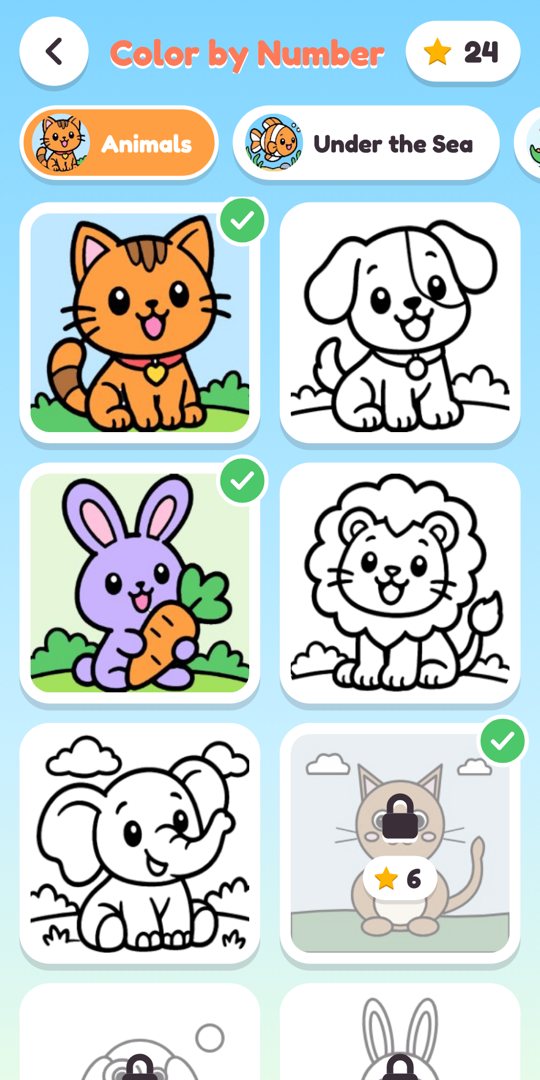
Themes matter too: animals, dinosaurs, vehicles, space, food and holidays cover most children's favorite subjects.
6. Rewards that encourage creating
Good rewards celebrate finishing a picture: a cheer, a sticker, a gallery of artwork. Be careful with games that push timers, spin wheels or constant pop-ups to keep children playing. The reward should be the picture itself.
7. A parent area behind a gate
Settings, external links and rating prompts should be behind a simple parent check, so a child cannot accidentally leave the game or change settings.
How Paint Pals answers the checklist
We used this list while building Paint Pals:
- Big icons, tap to fill, forgiving taps and undo.
- No ads while coloring, nothing in the first pictures, full-screen ads only after a finished picture with a gap between them; reward videos are optional and ads are child-directed in the Android app.
- No account and no personal information; drawings stay on the device.
- Works offline on Android (Google Play).
- Four modes, nine themes and 40 mandalas.
- Stars, a Sticker Book and a gallery — no spin wheels or loot boxes.
- Settings and links behind a parent check.
Final thoughts
No single game is perfect for every child. Try a few, watch how your child plays for ten minutes, and keep the one that leaves them calm and proud of their picture. If you want to start with ours, our beginner's guide and coloring tips will help you get going.