
How to Play Paint Pals: A Parent's Guide to Our Coloring Game for Kids

Paint Pals is the coloring game we built at Miwen Studio for children who love bright colors and cute characters. We designed it so a young child can play on their own after a minute or two of showing them around. This guide walks you through everything once, so you know what your child will see and where the grown-up settings live. You can play Paint Pals free online while you read, or install it on Android from Google Play.
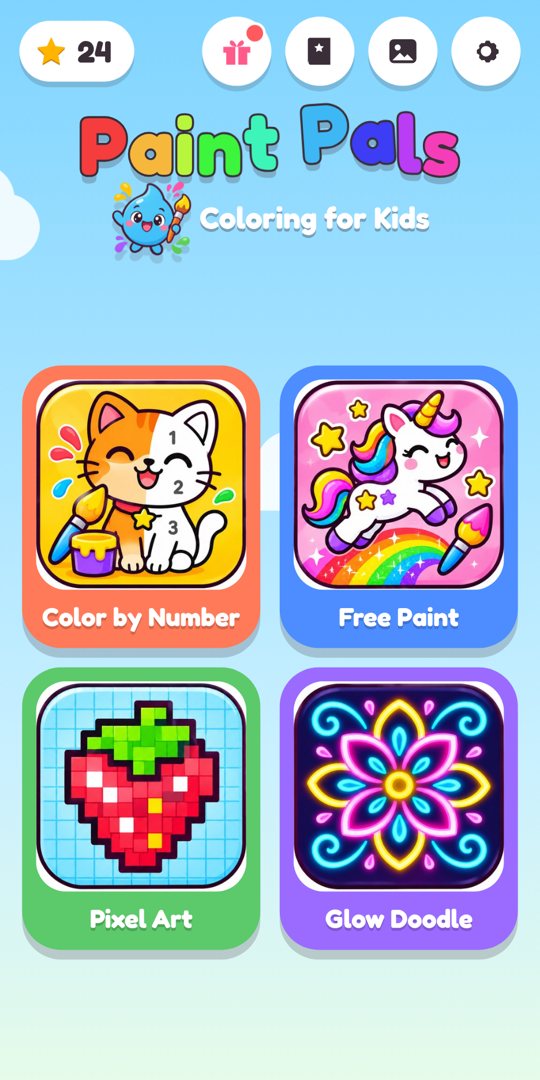
The home screen
The home screen shows four large cards, one for each way to create. Above them is a small bar with the star counter, the daily gift, the Sticker Book, the gallery and a gear icon for parents. Everything uses pictures and colors rather than words, because many players cannot read yet.
Stars
Stars are the only currency in the game. Children earn them by finishing pictures (three stars in Color by Number and Pixel Art, two in Free Paint and Glow Doodle) and by opening the daily gift. Stars unlock extra pictures and new stamps. There are no in-app purchases.
The daily gift
A wrapped present wobbles on the home screen when a new gift is ready. Tapping it opens a seven-day calendar. Coming back on consecutive days grows the streak, and day seven includes a bonus stamp for Free Paint.
The four coloring modes
1. Color by Number
Pick a theme, tap a picture, and the palette appears at the bottom with numbered color buttons. Spaces in the picture that match the selected number are gently striped so they are easy to spot. Tap one and it fills with a smooth splash. When a color is complete, its button shows a green check and the next color is selected automatically. We explain this mode in more detail in our color by number guide.
2. Free Paint
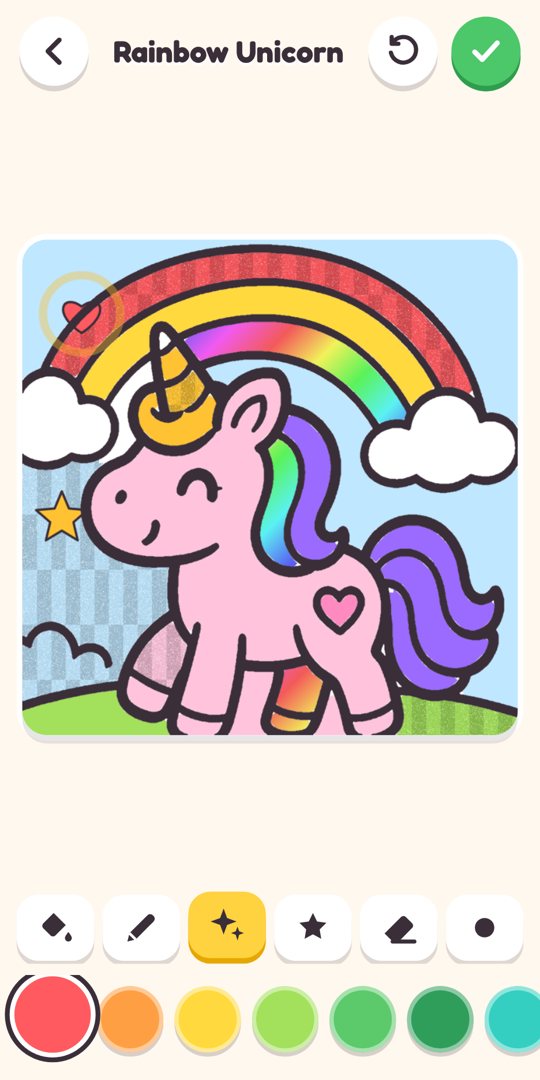
Free Paint is the open-ended mode. The bucket fills any space with the selected color, while the crayon, glitter brush and eraser let children draw freely. Under the bucket you will find magic fills: glitter, rainbow, stripes, dots and shine. The star icon opens the stamp tray. An undo arrow sits at the top, which is handy for small hands.
3. Pixel Art
The picture turns into a grid of numbered squares. Children can tap one square at a time or swipe across a row to fill every matching square under their finger. It is a nice step up for children who are already comfortable with Color by Number.
4. Glow Doodle
A dark canvas and neon colors. Whatever your child draws glows, and the mirror button repeats each line two, four, six or eight times around the center. There is no wrong way to play this mode, which makes it a favorite for the youngest players.
Finishing a picture
When the last space is filled (or the green check is tapped in Free Paint and Glow Doodle), a celebration screen appears with the finished artwork, a cheer, confetti and the stars earned. The first time a picture is finished in any mode, it becomes a sticker in the Sticker Book. Every finished picture is also saved in My Gallery.
| Where | What you find |
|---|---|
| Sticker Book | A collection page for each theme, plus the stamp collection |
| My Gallery | Your child's finished pictures, newest first |
| Parents (gear) | Sound, music, vibration, privacy policy and ratings |
The parent area
The gear icon opens a short parent check: a multiplication question with four answers. Behind it you can switch sounds, music and vibration on or off, read the privacy policy and leave a rating. Links that leave the game and saving pictures to the device are protected by the same check.
A note on ads
Paint Pals is free and supported by ads, and we were careful about how they appear. There are no ads while a child is coloring, the first finished pictures are ad-free, and full-screen ads only appear after a finished picture with a gap between them. Videos that give a reward, such as doubling stars, are always optional. In the Android app, ads are set to child-directed and family-safe content.
Quick start checklist
- Open Paint Pals and choose Color by Number.
- Pick the Animals theme and the kitty.
- Show your child how to tap a color, then a matching number.
- Let them finish the picture and enjoy the celebration together.
- Visit the Sticker Book to see their first sticker.
That is all it takes. If you want ideas for making coloring time calm and creative, read our coloring tips for kids. Have fun, and happy coloring!